
Tackle Football Playmaker X
True Partners, LLCSports
4.5113.00 Reviews
- Version
- 1.9.0
- Installs
- 100.00K
- Age Rating
- Everyone
Screenshots
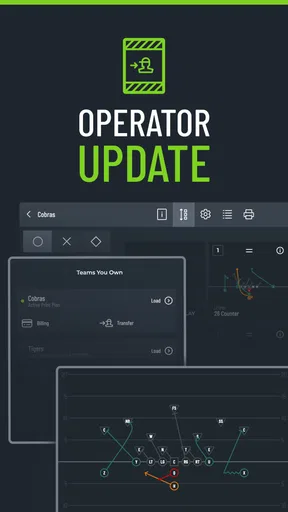
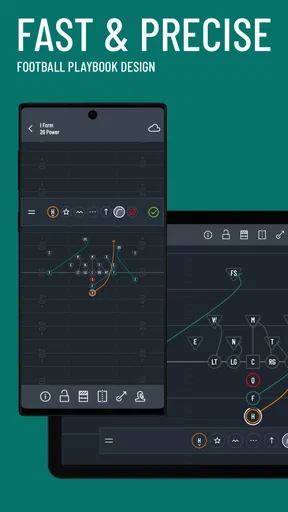
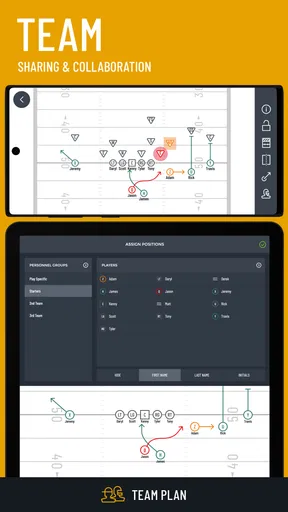
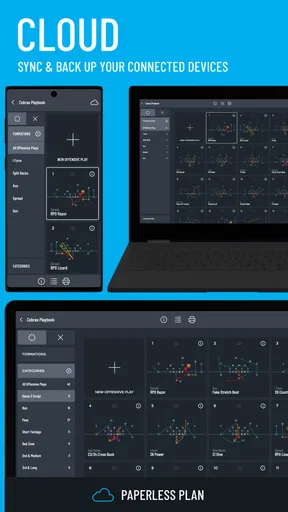
Our Review of Tackle Football Playmaker X
 Analysis by Appyee
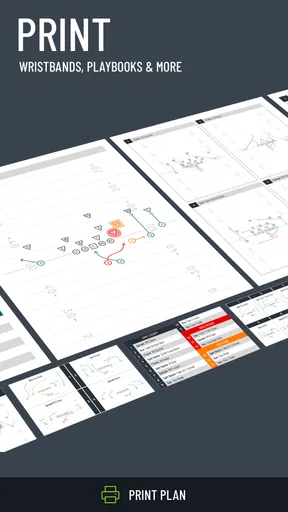
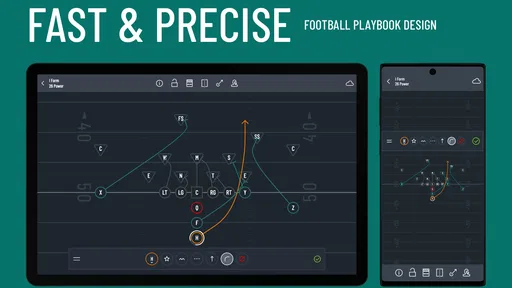
I came away from Tackle Football Playmaker X with a clear impression: this is a focused football planning tool for coaches who want to move playbook work away from loose paper sketches and into a more organized mobile workflow. It is not trying to be a general sports app, a game, or a full team-management platform. Its value is narrower and more practical: helping with tackle football playbook design, then supporting printed playbooks and wristbands.
That focus is also the reason I would recommend it selectively. If you coach, assist with, or regularly prepare plays for a tackle football team, the app has a useful place in your routine. If you only want to watch football, learn basic rules, or follow scores, it is the wrong kind of sports app entirely. My overall view is positive, but it depends heavily on whether you actually need to create and distribute football plays rather than simply consume football content.
What the app is really useful for
The strongest part of the experience is the way it treats a playbook as something that has to be used on the field, not merely drawn once and forgotten. Designing a play is only the first step for a coach. The information must later be printed, taught, remembered, and accessed quickly by players. Tackle Football Playmaker X is built around that chain, which makes it more relevant than a generic drawing app for this particular job.
I found the idea especially practical for coaches who are constantly revising their system. A playbook often changes after practice: a route may need to be adjusted, a blocking assignment clarified, or a formation simplified for a younger group. Keeping those changes in one football-specific workspace is more sensible than maintaining several paper binders or trying to adapt presentation software that was never designed for football diagrams.
The app comes from True Partners, LLC and is listed in the sports category. It is free to install, with optional in-app purchases priced from $10.99 to $15.99 per item. That pricing matters because the initial download lets a coach evaluate the workflow before committing money, while the paid items mean the complete experience should not be judged solely by the free entry point.
Its public reach is respectable for such a specialized tool, with over 100 thousand installs. The average rating is 4.5 from more than 300 ratings, alongside over 100 written reviews. I would not treat those figures as proof that it will suit every coaching style, but they do suggest that the app has found a real audience beyond a handful of experimental users.
From a rough idea to something teachable
The most useful way to approach the app is to think in stages. First, build or refine the play. Next, inspect it as a teaching document rather than as a personal reminder. Finally, prepare the material for the people who need it. That last step is easy to overlook when using a general-purpose sketching tool, but it is central here because the app specifically supports playbook and wristband printing.
A good workflow is to create the basic version of a play before adding every coaching note. Once the structure is clear, I would review the diagram from the perspective of different players. A quarterback needs to understand the timing and reads. A receiver needs a clean route assignment. A lineman needs blocking responsibility without being distracted by information meant for someone else. Preparing materials with those different viewpoints in mind can make the same play easier to teach.
This is one of the app’s less obvious strengths: it encourages a distinction between designing a play and communicating a play. A diagram that looks complete to a coach may still be too crowded for a player. The ability to work toward printed playbooks and wristbands makes that communication problem part of the planning process instead of an afterthought.
For a small coaching staff, that can save repeated work. One person may create the concept, another may review assignments, and a third may prepare materials for practice. I would still check every final version carefully before printing, especially when changes are made close to game day. A mobile screen can make small labels or assignment details appear clearer than they will be on a physical page or wristband.
A realistic weeknight use case
Imagine a coach leaving practice with three plays that worked well and two that caused confusion. Rather than rewriting the entire binder, the coach can use the app to revise the diagrams while the details are still fresh. The next step is not simply saving the new versions; it is deciding which plays belong in the next practice packet and which need a smaller, quicker reference for players.
That is where the printing emphasis becomes meaningful. A full playbook can support a more complete explanation, while a wristband is better suited to fast access during a noisy game. The coach still has to decide what information belongs in each format, but the app’s purpose matches that real-world distinction. I see it as most valuable during an active season, when the playbook is a living document rather than a finished project.
Another useful habit is to keep a clean “teaching” version separate in your thinking from a “game-day” version. The first can contain more explanation; the second should be quick to scan. Even if the app does not replace your coaching notes, using its design and printing workflow this way can reduce the temptation to put every detail everywhere.
Where it stands out, and where it slows me down
Compared with drawing plays in a general graphics app, this tool has a much clearer purpose. A blank canvas gives you freedom, but it also makes you responsible for building a usable football system from scratch. A football-specific app reduces that conceptual overhead. You are approaching the task as a playbook problem rather than as an illustration problem, which is a meaningful difference when time is limited.
It also compares favorably with paper for revision. Paper remains quick for a first sketch, and some coaches will always prefer the feel of a marker on a board. The weakness is that paper copies become difficult to keep synchronized. A correction made on one sheet may never reach every assistant or player. A digital workflow is more attractive when the same material needs to be updated and prepared for multiple uses.
On the other hand, I would not replace every coaching tool with this app. A spreadsheet may still be better for tracking personnel, tendencies, or practice attendance. A team communication service may be better for announcements and schedules. A full desktop design program may offer more control for a coach who wants highly customized visual layouts. Tackle Football Playmaker X makes the most sense as the play-design and distribution part of a broader coaching setup.
The meaningful limitation is the narrow audience
The app’s specialization is a strength until your needs move outside tackle football playbook work. It is not a universal football reference, and it is not aimed at casual fans. Someone looking for drills, live scores, player statistics, recruiting information, or video analysis should look elsewhere. Even a coach who works mainly with a different football format may find that a tackle-focused workflow does not match the terminology or structure they use.
There is also a practical learning curve in creating material that is genuinely readable. The app can support the production process, but it cannot decide whether a play is too complicated, whether an assignment is ambiguous, or whether a wristband reference is too dense for quick use. Those remain coaching decisions. I would budget time for review and a test print instead of assuming that a diagram that looks fine on a phone is ready for the field.
The optional purchases are another point to consider. Since the app is free but includes items in the $10.99 to $15.99 range, a coach should explore the free experience first and identify which parts of the workflow are actually needed. That is a better approach than buying immediately and discovering that the app’s design process does not fit the team’s existing habits.
My other reservation is about scale. For a single coach or a small staff, a focused mobile tool can feel efficient. For a large program with strict approval processes, extensive terminology, or a separate design department, it may be only one piece of the process. The app can help prepare football material, but it should not be mistaken for a complete organizational system.
Small workflow choices that make a difference
I would start by designing one representative play rather than attempting to recreate an entire season’s playbook immediately. Choose a play with several assignments and take it through the complete cycle: design, review, print preparation, and player explanation. This reveals whether the app fits your team before you invest the effort of migrating everything.
Second, review diagrams at the size they will actually be used. A detailed playbook page and a wristband reference serve different purposes. If a player has to pause to interpret the graphic, the design needs simplification even if the underlying play is sound. This is a specific trade-off that often gets missed when coaches focus only on drawing accuracy.
Third, establish a naming habit before the playbook grows. Whether you use formations, concepts, numbers, or your own terminology, consistency matters more on a wristband than in a private notebook. A clear naming system makes revisions easier to spot and reduces the chance that two similar plays are confused during practice.
Finally, involve at least one person who did not create the play in the review. The creator naturally fills in missing meaning from memory. A fresh reader exposes unclear arrows, crowded labels, and assignments that make sense only because the coach already knows the intention. This is one of the best ways to get more value from a design-and-print tool without adding unnecessary complexity.
Who should use it, and who should skip it
I think it is a strong fit for tackle football coaches who are moving from handwritten diagrams to a repeatable digital process. It should also appeal to assistants who prepare materials for practices, coaches who frequently adjust plays, and teams that want both fuller playbook pages and compact wristband references. The free starting point makes it reasonable to test with one or two real plays before deciding whether the paid options are worthwhile.
It is less suitable for a fan, a player who only wants to study an existing playbook, or someone seeking a broad sports companion. It may also be a poor fit for a coach who already has a polished desktop workflow and needs advanced layout control beyond a mobile-centered tool. In those cases, the convenience of a specialized app may not outweigh the limitations of changing systems.
The age rating is Everyone, which makes the app broadly accessible from a content-rating perspective. That does not remove the need for sensible team supervision, especially when young players are being given printed material, but it does mean the app is not positioned as an adults-only product.
Version, access, and the final decision
The current version is 1.9.0 and the minimum operating-system requirement is version 9. That makes it approachable for many older devices, which is useful for coaching staffs that may not all carry the newest phones or tablets. I would still test the exact device that will be used for printing and sideline reference work, because a comfortable workflow depends as much on screen size and handling as on the app itself.
After using it as a focused football planning tool, I would recommend Tackle Football Playmaker X to the coach who wants a practical bridge between play design and physical team materials. Its best quality is not that it makes football strategy easier; no app can replace sound coaching. Its best quality is that it keeps the design, revision, and distribution problem close together.
My verdict: choose it when your main problem is organizing and communicating tackle football plays, not when you need an all-purpose sports app. The free installation gives you a sensible way to test the workflow, while the optional purchases deserve a deliberate decision based on how much printing and preparation your team actually does. For the right coach, that focus is useful. For everyone else, the narrow purpose is a clear signal to keep looking.
Verdict
Strengths of Tackle Football Playmaker X
- Create and save custom football plays with flexible formations.
- Useful for coaches planning practices, games, and team assignments.
- Play diagrams are easy to understand at a glance.
- Supports detailed player routes and movement instructions.
- Helps organize play ideas without carrying a physical playbook.
Limitations of Tackle Football Playmaker X
- Advanced play design may take time to learn.
- Small-screen editing can feel cramped on some phones.
- Best suited to American football rather than other football codes.
- Large playbooks may require extra time to organize.
- Some features may be limited depending on the device or version.
Other Releases by True Partners, LLC
View All
Flag Football Playmaker X
Sports4.4
Similar Picks in This Category
View All
BeSoccer: Soccer Live Score
BeSoccer apps4.3

Cricbuzz - Live Cricket Scores
Cricbuzz.com3.7

NFL
NFL Enterprises LLC2.4

Da Fit
MO YOUNG LIMITED3.6

ESPN
Disney4.5

LiveScore: Live Sports Scores
LiveScore Limited4.5
Frequently Asked Questions
What is Tackle Football Playmaker X?
Tackle Football Playmaker X is a football play-design and strategy app aimed at coaches, players, and enthusiasts who want to create, organize, and review offensive or defensive plays. It is designed to make play planning more visual, allowing users to map routes, assignments, formations, and adjustments rather than relying only on handwritten notes or static diagrams.
Who can benefit most from using Tackle Football Playmaker X?
The app can be useful for youth, high school, amateur, and recreational football teams, as well as individual coaches preparing game plans. Players may also use it to study assignments and understand formations. However, beginners should expect to spend some time learning the interface and football terminology, especially if they have never used a digital playbook or play-design tool before.
Can I create and customize my own football plays?
Yes, the main purpose of Tackle Football Playmaker X is to support custom play creation. Users can generally start with a formation or blank field and add player positions, routes, blocking movements, defensive responsibilities, and other instructions. This makes it more flexible than a simple collection of pre-made plays, although the exact customization options may depend on the app version and device.
Does Tackle Football Playmaker X require an internet connection?
An internet connection may be needed for downloading the app, receiving updates, accessing account-related services, or using any online sharing and synchronization features. Once plays are saved locally, basic viewing and editing may be available offline, which is convenient during practices or games with limited connectivity. Before relying on it at the field, test your saved playbook offline on your particular device.
Is Tackle Football Playmaker X free to download and use?
The availability of free features, advertisements, in-app purchases, or subscription options can vary according to the platform and current release. Users should check the Google Play Store or Apple App Store listing before downloading to confirm the price and any recurring charges. It is also worth reviewing which tools are included in the basic version and which advanced playbook or sharing features require payment.
